Cookie settings: We use cookies to analyze site traffic and optimize your experience. Read our Privacy Policy for details.
Shop Floor Scheduling Built Around Real Manufacturing Outcomes
Every feature designed to prevent scrap, eliminate setup delays, protect capacity, and keep machinists cutting.
Visual Scheduling
Drag-and-drop board, instant gap finder & auto-extend
Shop Floor Operators
Prevent operator burnout & unassigned spindles
Visibility & Alerts
Wall TV kiosk mode & 48h deadline warnings
ISO 9001 Audit
Pass audits without digging through paper files
Dependencies
Prevent cutting parts before prior ops finish
Machines & Setup
Know you're overbooked before promising dates
Scheduling
End scheduling chaos across your shop floor
Know exactly what is running on every spindle right now, what is queued next, and which machines are falling behind without walking out to the workshop.
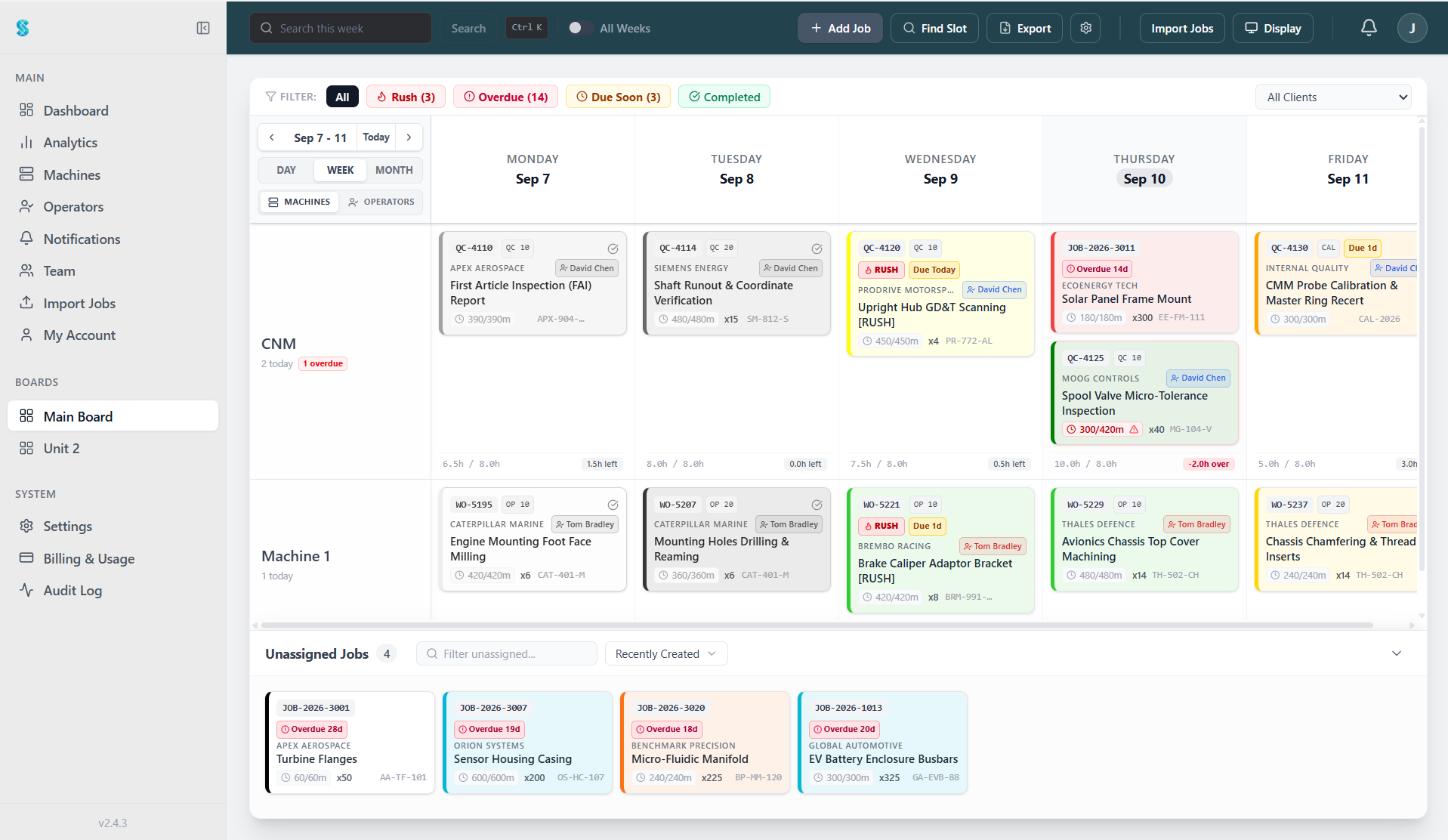
Update the schedule in seconds without erasing whiteboards
Move jobs between machines with one drag-and-drop action. Planners update from the office, and the live schedule syncs immediately to overhead displays across the workshop.
See every machine cell in one visual timeline Changes sync to shop screens with zero delay
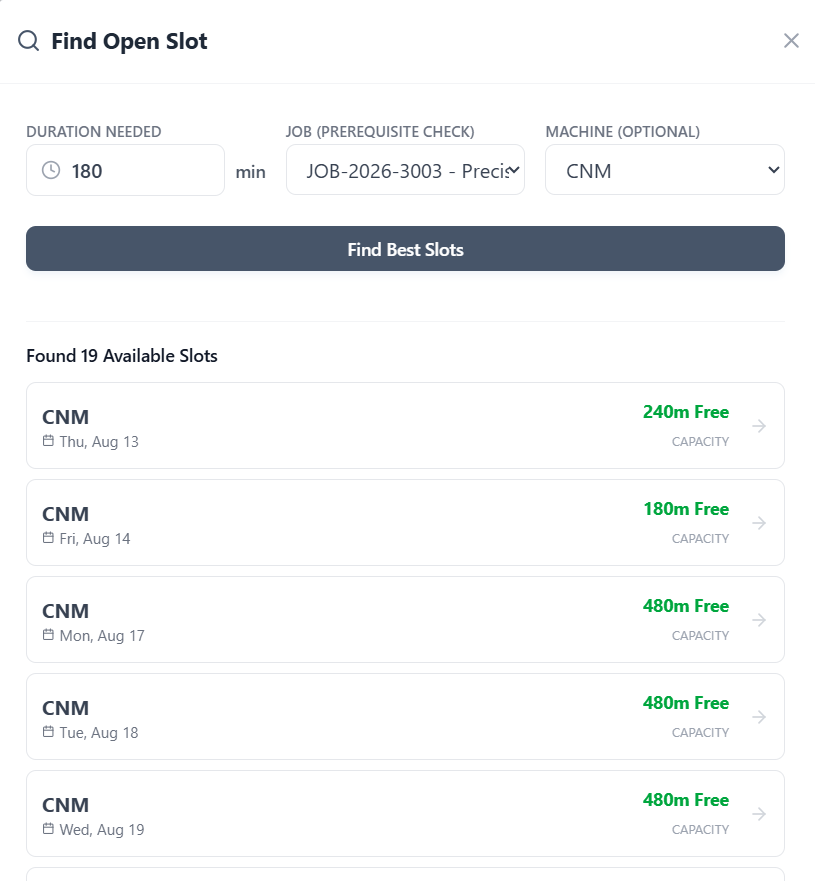
Quote accurate delivery dates without guessing spindle availability
Tell Synctile how long a job takes and which machine to run it on. It instantly finds the earliest open gap in your schedule, eliminating guesswork and spreadsheet hunting.
- Stop scanning weeks of spreadsheet rows for machine gaps
- Filter by machine capabilities, setup duration, and start date
- Lock in delivery dates you know your shop can hit
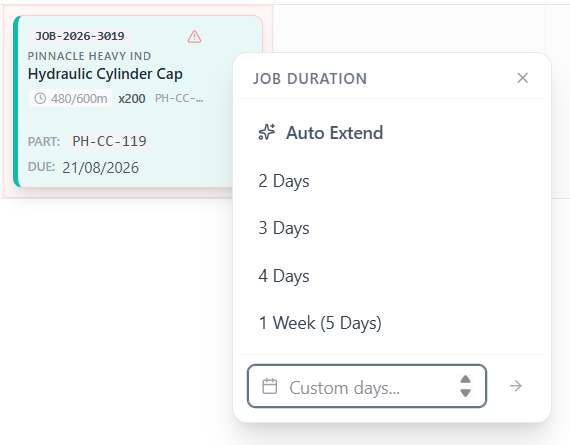
Handle cycle time overruns with zero scheduling friction
When a tough setup or tool break extends machining time, one click rolls remaining hours into the next shift without breaking downstream machine queues.
- Adjust run times in seconds without rewriting job cards
- Auto-Extend automatically splits spillover hours into tomorrow
Operators
Never leave expensive spindles idle for lack of an operator
Balance weekly workloads across your team, ensure only certified machinists run critical centres, and catch unassigned machine jobs before the shift starts.
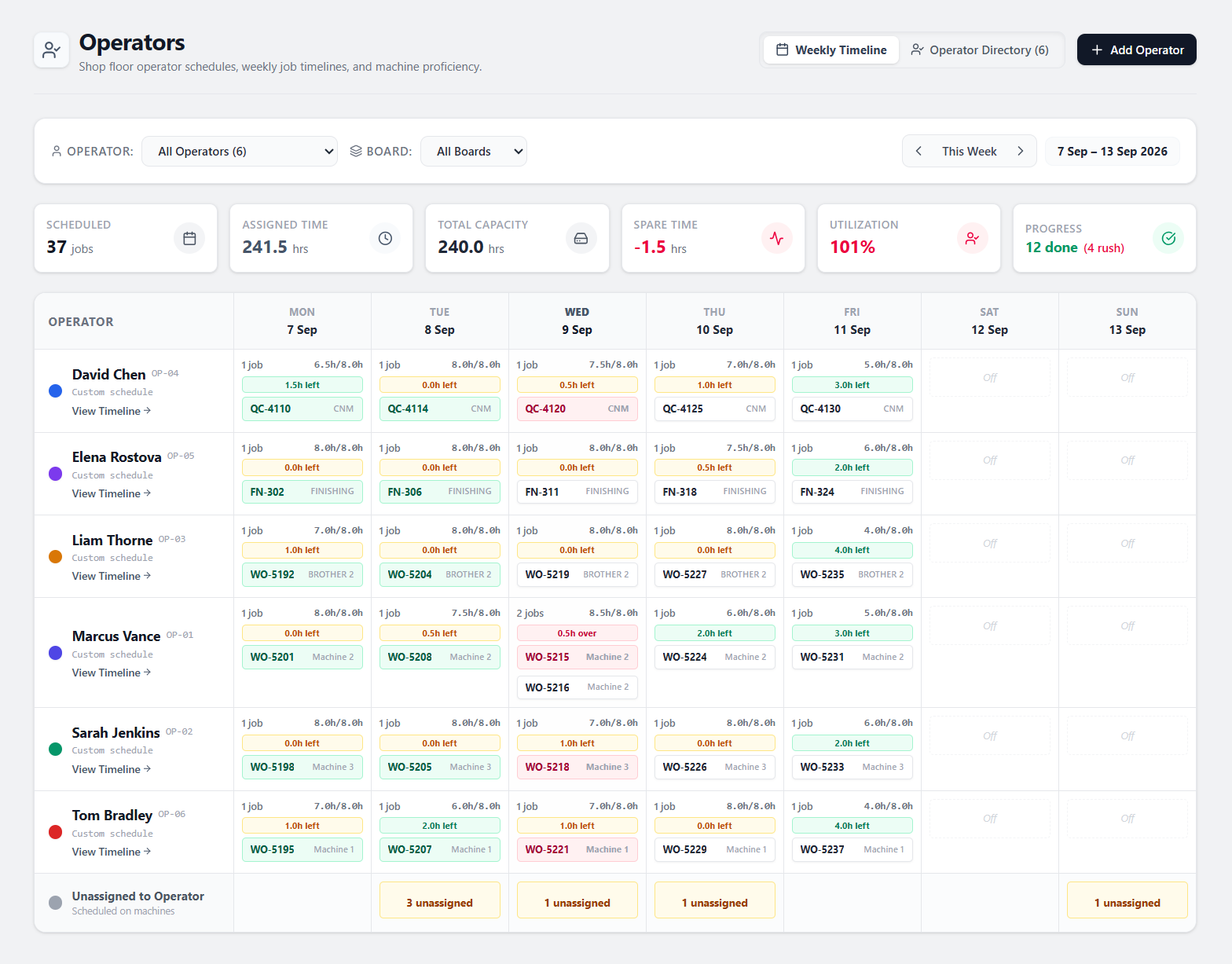
Prevent operator burnout and shift imbalances before they happen
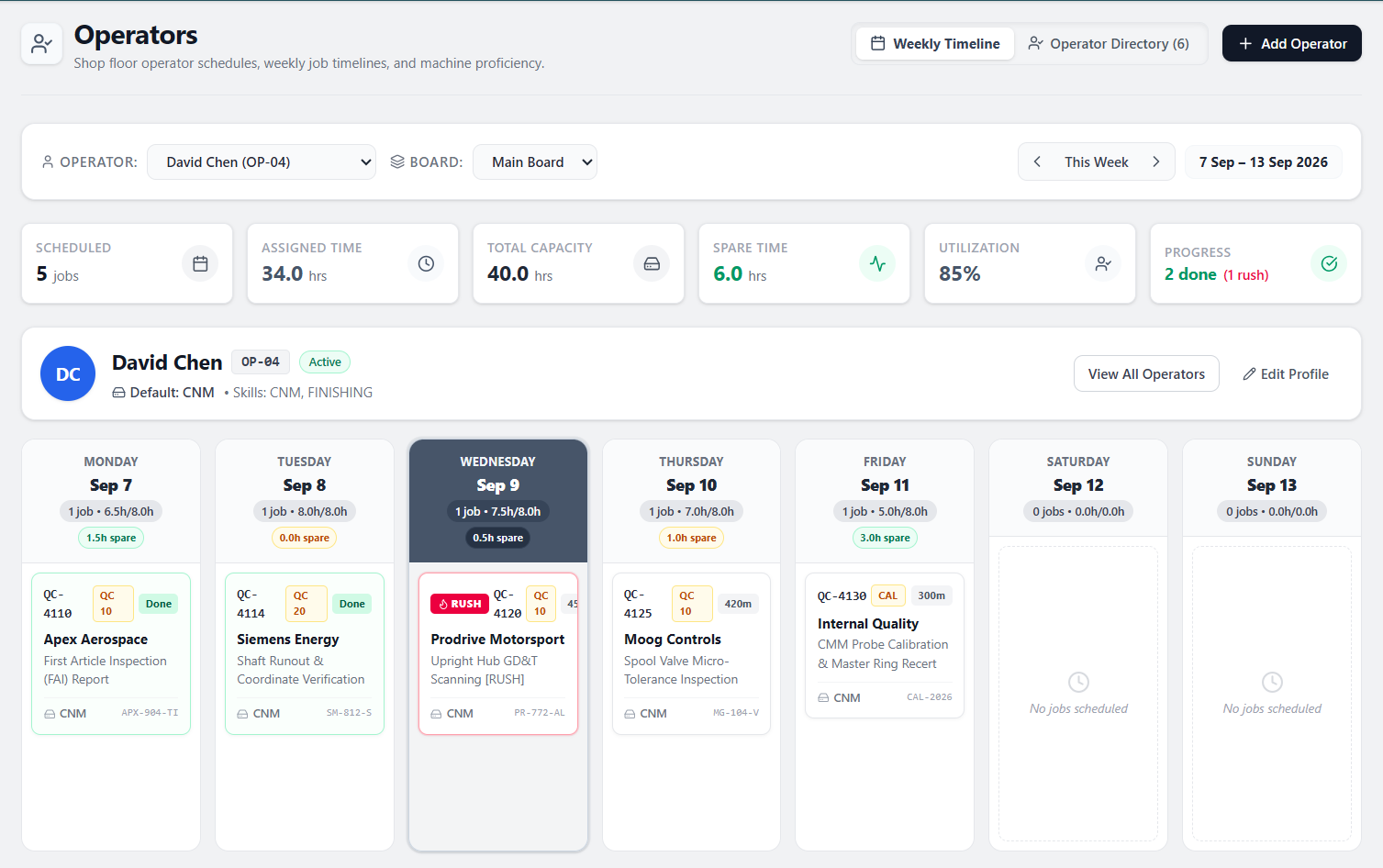
See everyone's workload Monday to Sunday in one clear matrix. Spot who is overloaded with overtime, who has spare spindle hours, and which machines are scheduled without an operator.
Live team-wide utilisation and spare capacity tracking Red overload alerts stop unplanned overtime costs Catch unassigned jobs before morning shift begins
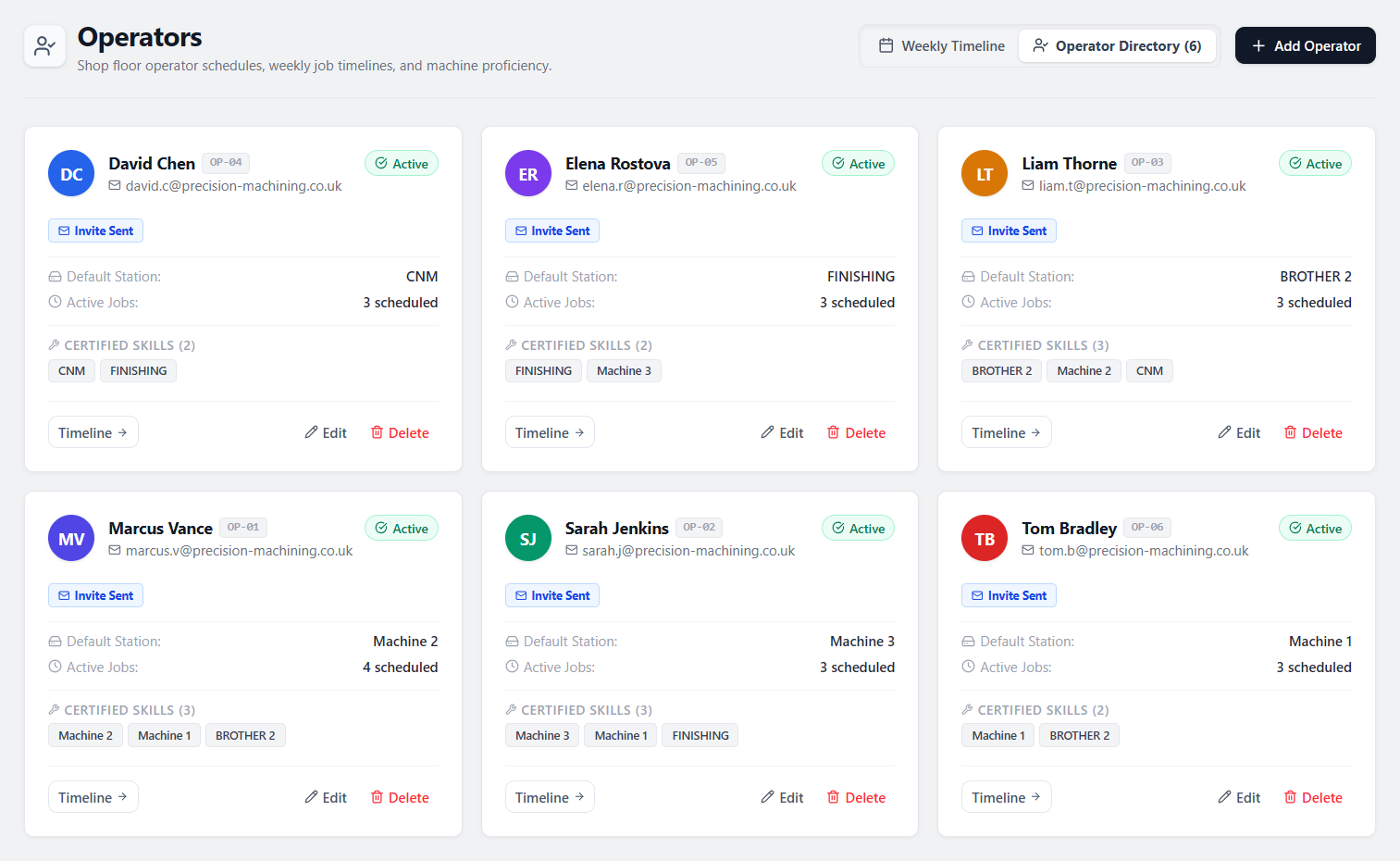
Ensure only certified machinists run high-value machine tools
Tag certified machine proficiencies so schedulers never allocate complex 5-axis work or precision grinding to uncertified staff, protecting your tooling and parts.
- Default station assignments for CNC, finishing, and fabrication bays
- Certified skill tagging eliminates costly operator scrap errors
- Instant visibility into active work orders per operator
Cut shift handover meetings down to five minutes
Review individual assigned hours, remaining shift capacity, rush priorities, and completed work orders so oncoming supervisors know exactly what was finished and what is in progress.
- Daily hour breakdowns with remaining shift capacity indicators
- Clear visibility into rush priorities and urgent customer deadlines
- Live completion tracking with signed-off job status badges
Visibility & Alerts
Keep the shop floor and front office on the exact same page
Wall-mounted workshop screens and office dashboards eliminate endless walk-arounds, phone calls, and confusion about which job to run next.
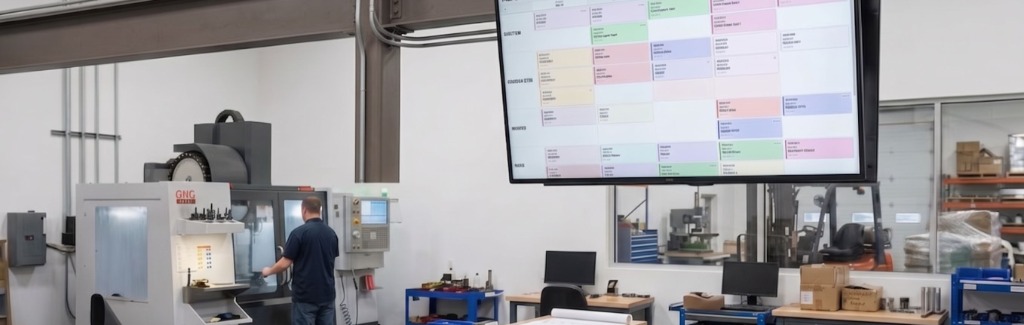
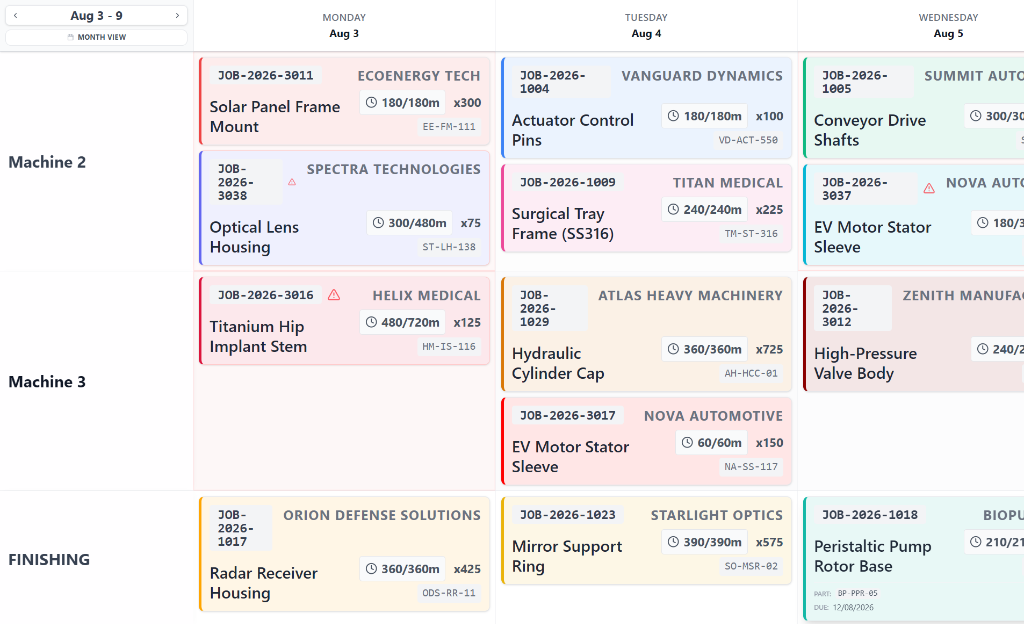
Machinists see what's next without leaving their machines
Mount a standard TV on the workshop wall. High-contrast cards update in real time so setters and operators always know the queue order without needing a mouse, keyboard, or trip to the office.
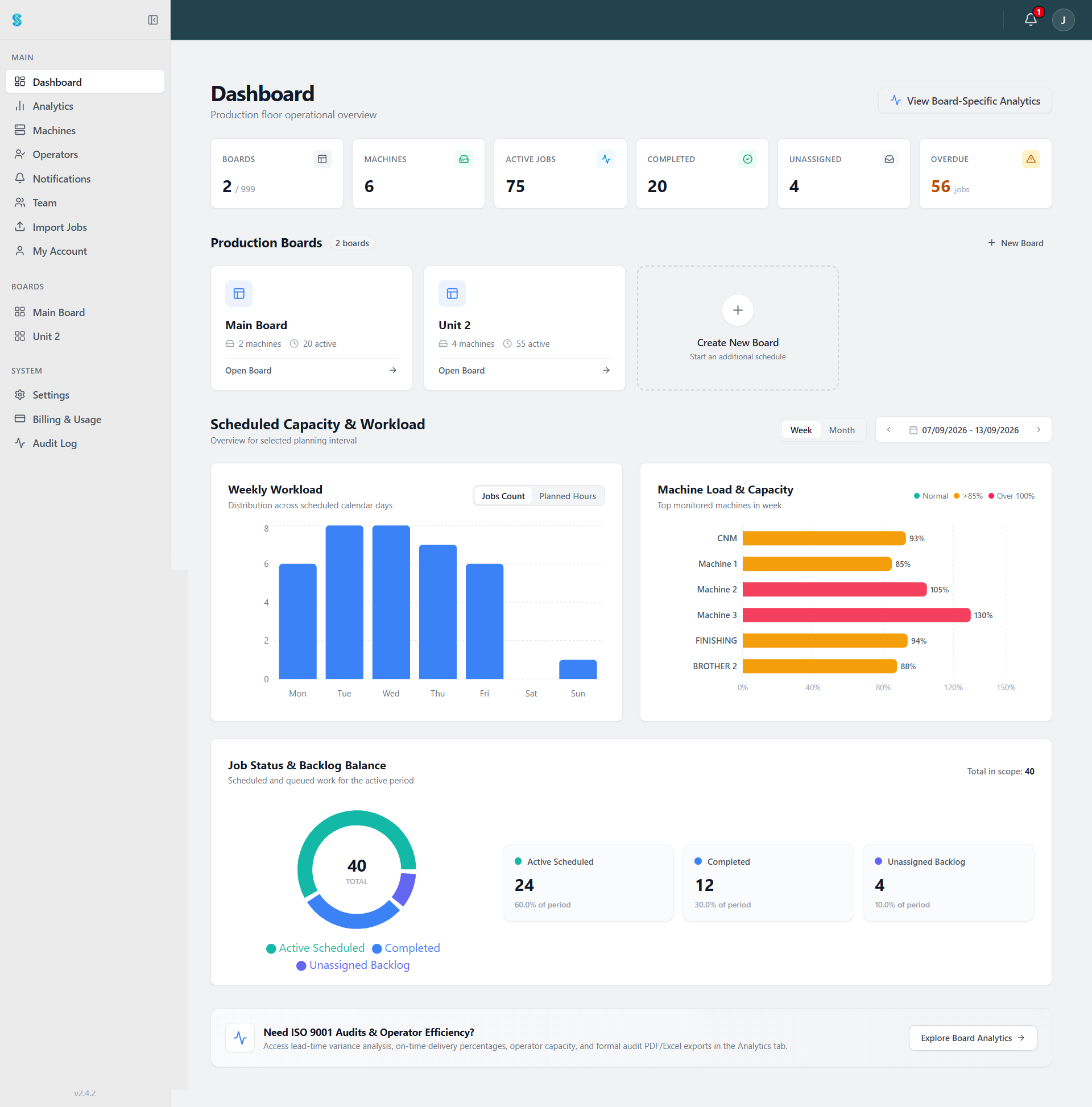
Spot bottlenecked departments before your customers notice
Track active job progress and weekly machine utilisation at a glance so you can reassign operators between bays before backlog turns into late shipments.
- Live status overview across active work orders, machines & bays
- Weekly workload & spindle utilisation charts uncover hidden capacity
- Real-time completion tracking keeps management informed
Protect your schedule while keeping the shop floor informed
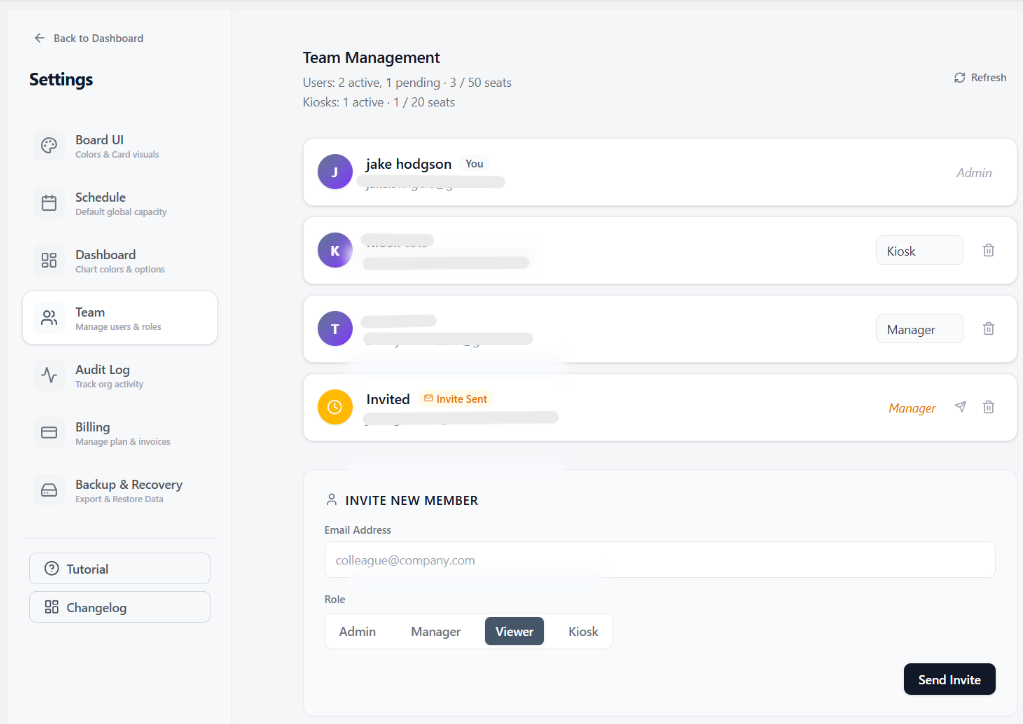
Give machinists touch-screen kiosk views to mark jobs done without allowing accidental edits to machine dates or customer work orders.
- Dedicated Kiosk roles prevent accidental schedule changes on shop TVs
- Planner, Operator & Kiosk seats sized for any size workshop
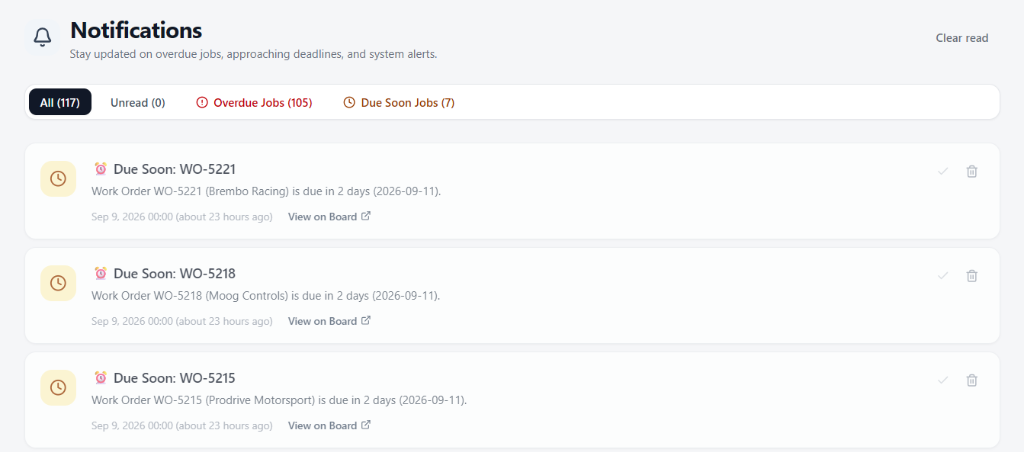
Catch slipping deadlines 48 hours before they become late deliveries
Automated alerts flag jobs approaching delivery dates or running overdue, giving you time to reassign work or notify customers ahead of time.
- Automated alerts for jobs due within 48 hours or running overdue
- Direct deep-links to locate and reschedule jobs on the board
- Filter notifications by unread, overdue, or due-soon status
Quality & Compliance
Pass quality audits without scrambling through paper files
Every job completion, machine allocation, and operator sign-off is logged automatically, ready to export into clean compliance PDFs in seconds.
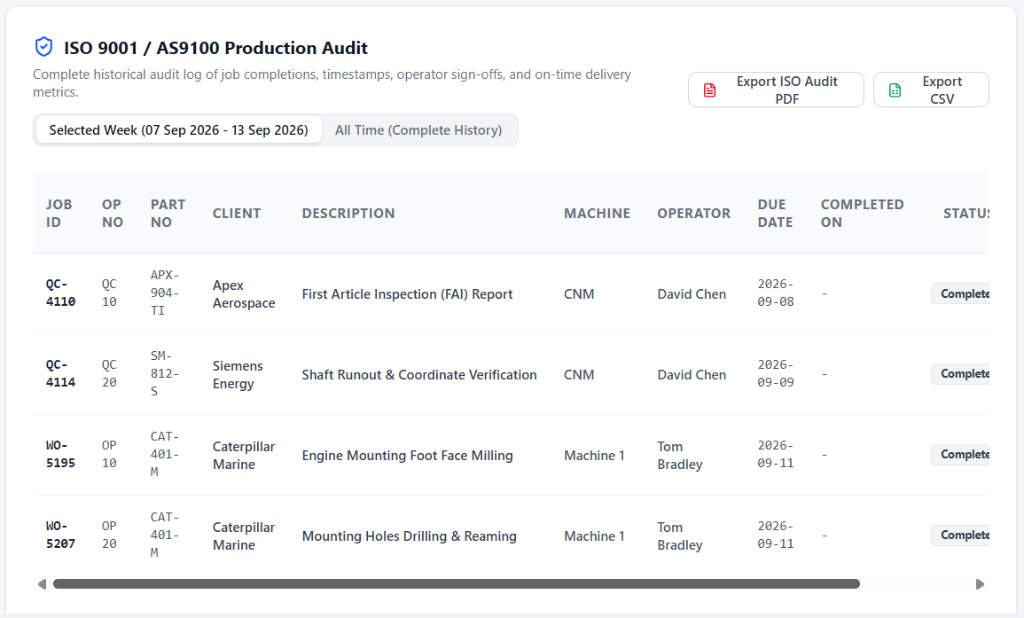
One-click compliance records when the auditor walks through the door
Stop digging through lever-arch files and lost paper travelers. Generate complete job traceability with verified timestamps and machine history in one click.
- One-click export to certified ISO 9001 and AS9100 audit PDF or CSV
- Filter historical completions by selected week or complete archive
- Tracks job IDs, operation numbers, part codes, clients, and operator sign-offs
Dependencies
Stop scrap and wasted setups on multi-stage jobs
Prevent machinists from cutting parts before upstream turning, laser cutting, or material inspection is signed off.
Machinists instantly see what work must finish first
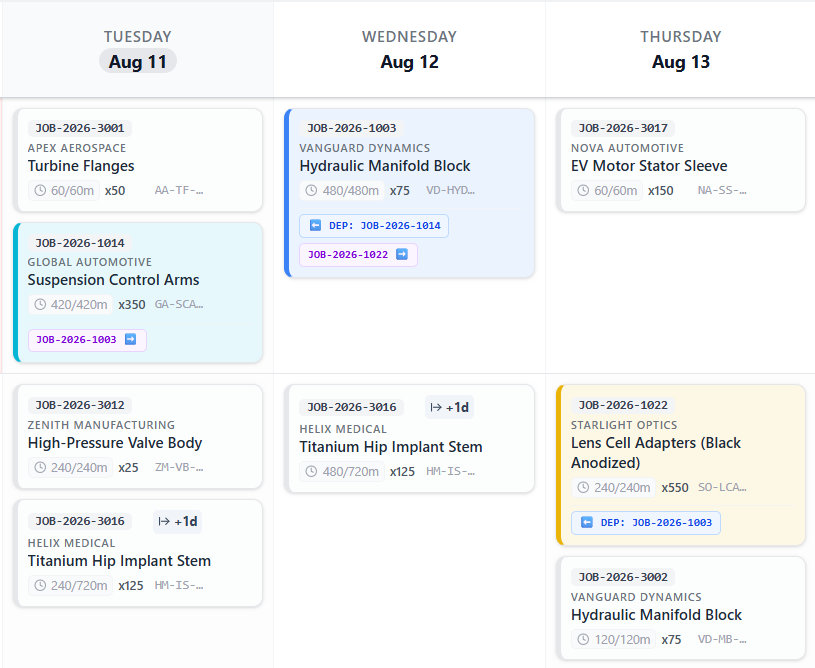
Each job card links directly to its prerequisite operation. Downstream operators never cut parts out of order or stage tooling before raw billets and previous operations are ready.
- Link operations directly to upstream routing steps
- Prerequisite badge shows exact previous job on the card
- Colour codes highlight high-priority rush work across work centres
Prevent machinists from cutting parts before material inspection is signed off
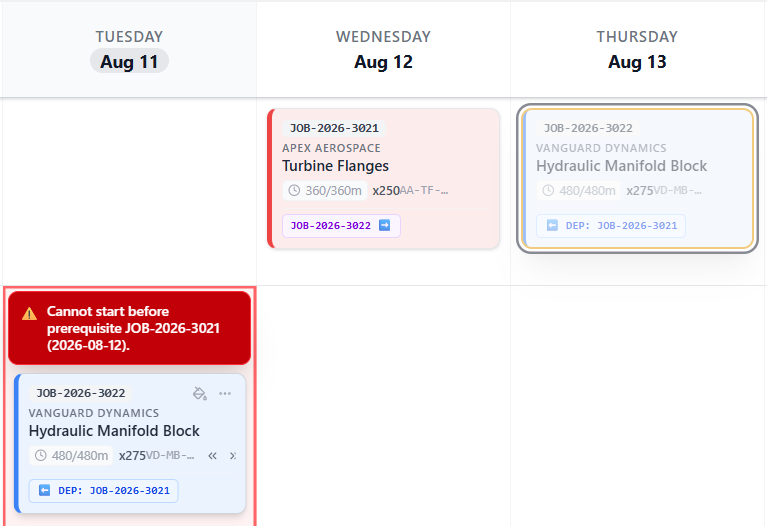
Synctile automatically validates job placement against prerequisites. If someone tries to schedule a downstream task before its prior operation or inspection is completed, the board flags an explicit warning so out-of-order work never reaches the machine.
- Automatic date validation stops downstream work starting too early
- Warning badges catch out-of-sequence jobs before tooling touches metal
Machines
Know you're overbooked before promising a Friday delivery date you can't hit
Set exact daily working hours for each machine or cell. Spot bottlenecked spindles and overloaded weeks before quoting jobs or committing to rush deadlines.
Protect shift targets and prevent unplanned overtime
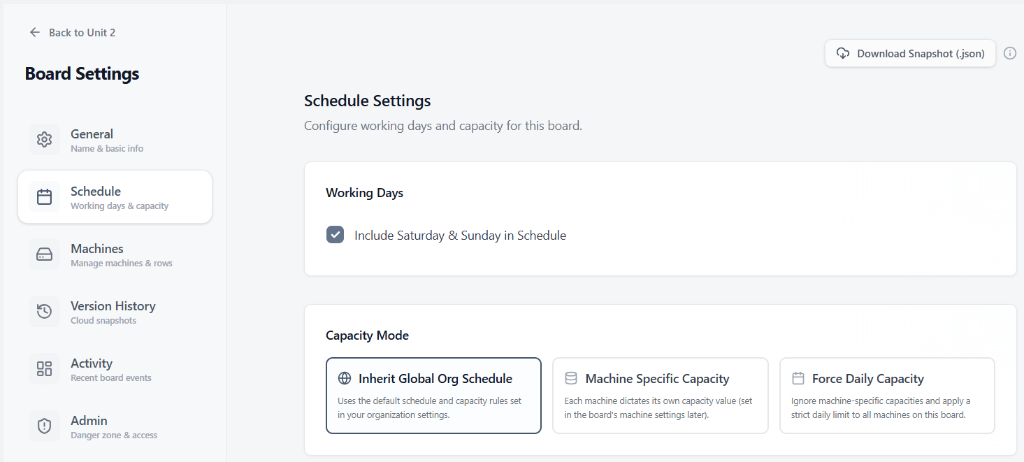
Match scheduled hours to your actual working shifts and weekend patterns so you never commit machine hours your shop cannot physically deliver.
- Toggle weekend working days in schedule
- Global org, machine-specific, or forced daily capacity modes
- One-click JSON snapshot download for offline backup
Mirror your physical workshop layout on screen
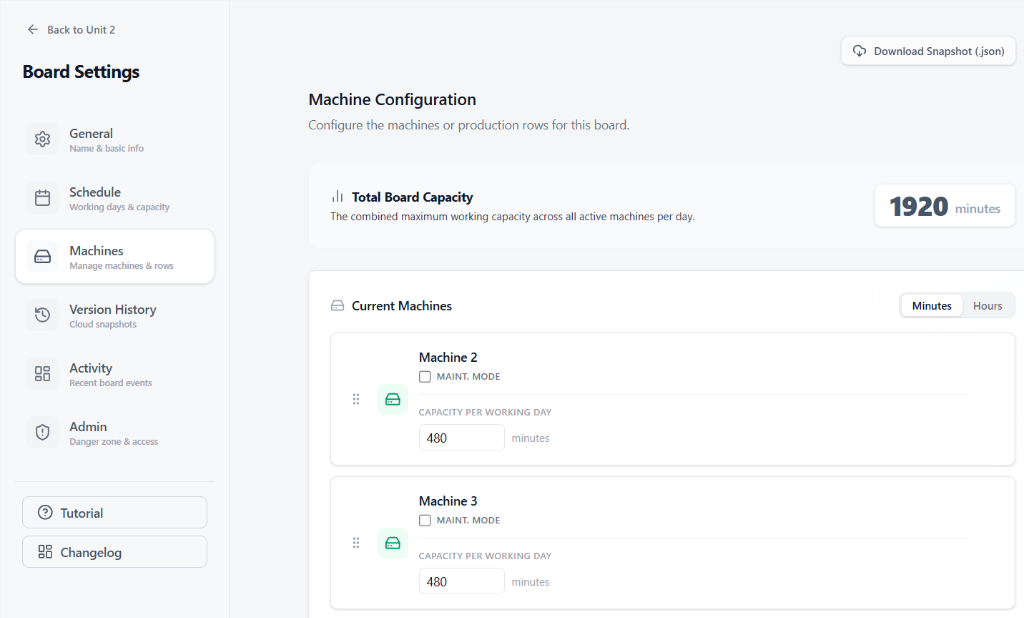
Set up work centres to match your factory layout, toggle Maintenance Mode during planned spindle downtime, and lock in exact daily capacities so planners never overbook a work centre.
- Drag-and-drop row reordering for shop floor layout alignment
- Toggle Maintenance Mode for scheduled downtime
- Set per-machine daily capacities (Minutes / Hours toggle)
- Central Machines hub in sidebar to manage all work centres
Daily capacity bars flag overloaded machines before bottlenecks hit the floor
When scheduled job hours exceed a machine's available shift capacity, the cell highlights red automatically. Spot overloaded spindles days in advance and rebalance work before late deliveries cost you customer trust.
Setup & Import
Go live in 15 minutes without expensive ERP consultants
Import your current job spreadsheet, map your columns, and have your shop floor board running on day one with zero IT headaches.
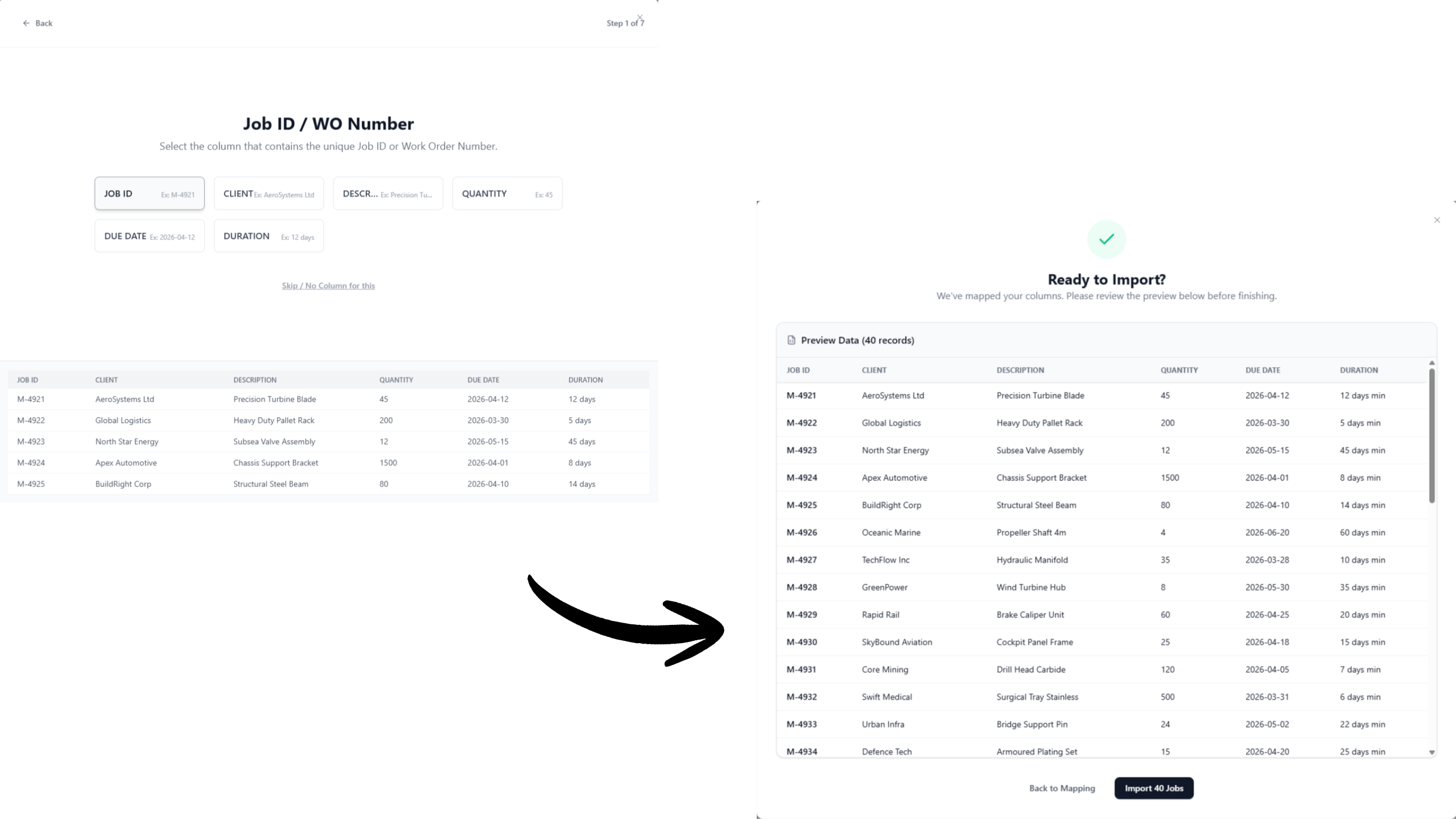
Ditch manual scheduling without re-entering your active jobs
Upload your existing Excel sheet or CSV. The column mapper matches your work order numbers, parts, and due dates directly into live cards in under two minutes.
- Drop in Excel (.xlsx) and CSV files directly from your desktop
- Smart column mapper matches your existing header names
- Live preview ensures zero corrupted data before going live
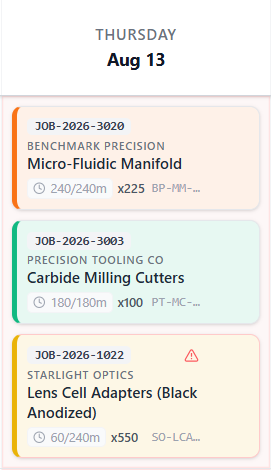
Queue incoming work orders without cluttering machine timelines
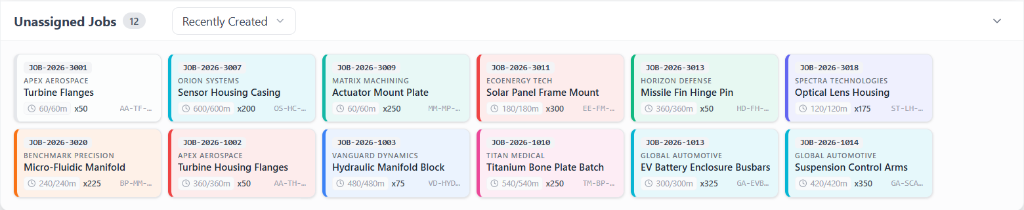
Imported jobs drop straight into an organized holding tray. Schedulers drag and drop tiles onto open spindle slots as soon as raw material arrives and machines become available.
- Instant job card generation directly from your imported spreadsheets
- Holding tray keeps unscheduled work clean and prioritized
- Drag and drop onto machine spindles in seconds
Every capability, built in
No expensive add-ons or hidden fees. Powerful built-in tools tailored to your workshop scale.
Zero-Delay Shop Floor Sync
When planners move a job in the office, shop floor screens update immediately. No reprinting job sheets, phone calls, or out-of-date whiteboards.
Operator Skill Matching
Ensure only certified machinists run critical centres, protecting expensive tooling and eliminating setup scrap.
ISO 9001 Audit Readiness
One-click compliance export with verified completion timestamps, machine histories, and operator sign-offs.
48-Hour Deadline Warnings
Catch slipping work orders two days early with automated alerts before late shipments damage customer relationships.
Instant Rush Job Slotting
Instantly find open spindle time for emergency customer work orders without manual spreadsheet hunting.
Accidental Edit Protection
Role-based kiosk access lets operators mark work complete while preventing accidental changes to scheduled dates.
Overhead TV Kiosk Mode
High-contrast, auto-refreshing wall displays let machinists see their next setup without walking to the works office.
Desktop & Browser Access
Run on any office PC, toughbook, or tablet. Download the native Windows app or open instantly in any modern web browser.
Offline Reliability
Continues running when workshop Wi-Fi drops and syncs automatically once reconnected without losing card movements.
Prevent Scrap & Routing Errors
Prevent machinists from cutting parts before upstream turning, laser cutting, or material inspection is signed off.
1-Click Shift Spillover
Roll overrunning cycle times into the next day with one click without manually rewriting the rest of the schedule.
Shop-Specific Terminology
Customise labels across work orders, drawings, ops, and part numbers to match your workshop's daily vocabulary.
Flag Overloaded Machines
Daily capacity bars flag overbooked machines so you know you're at capacity before promising a delivery date you can't hit.
Instant Excel Migration
Import active work orders from spreadsheets directly into live cards in under two minutes without retyping data.
Print-Ready Work Orders
Generate clean, printable PDF job travellers and run sheets for physical shop floor routing and quality traveller folders.
Instant Visual Priority
Colour code jobs by customer, material hold, or rush status so operators instantly spot urgent work from across the shop.
Feature & Implementation Questions
Quick answers about how Synctile integrates into your daily manufacturing workflow.
Can I import my existing production schedule from Excel or CSV? ▼
Yes. You can upload or paste spreadsheets directly to instantly populate job cards, machine assignments, and due dates without manual data entry.
Does Synctile work offline if shop floor Wi-Fi drops? ▼
Yes. Synctile caches board data locally on your device. If Wi-Fi drops, operators can continue viewing and moving cards. Updates sync automatically once reconnected.
How do multi-station job routings and dependencies work? ▼
You can visually link operations across multiple work centres. When an upstream step completes, downstream cards highlight automatically to show they are ready for production.
How long does it take for operators to learn the kiosk interface? ▼
Operators typically learn the interface in under 10 minutes. The touch-friendly card layout functions just like a physical T-card rack or whiteboard.
Modernise your shop floor in 15 minutes
Import your existing job list, configure your machines, and invite your team. No training courses, no implementation partner, no ERP project.