Cookie settings: We use cookies to analyze site traffic and optimize your experience. Read our Privacy Policy for details.
Why We Built Synctile
Software built for the shop floor, not the boardroom.
Most manufacturing software is designed for corporate accountants, IT departments, and board presentations. We built Synctile for workshop owners, production managers, and machine operators who just need a clear, visual schedule that keeps spindles turning.
Full 90-day free trial
Cancel anytime online
15-minute quick setup
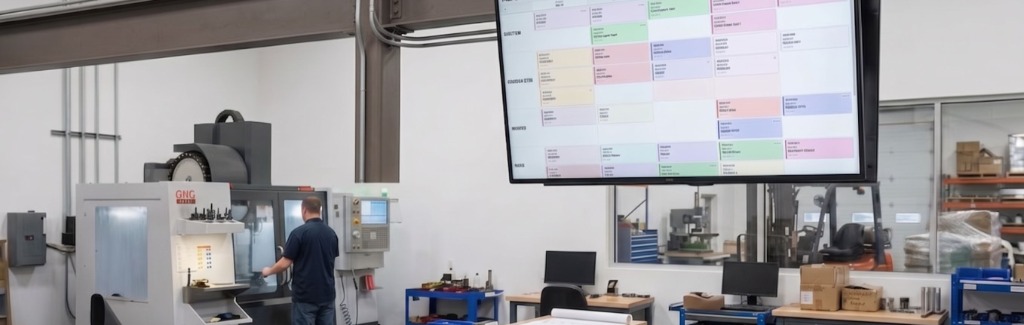
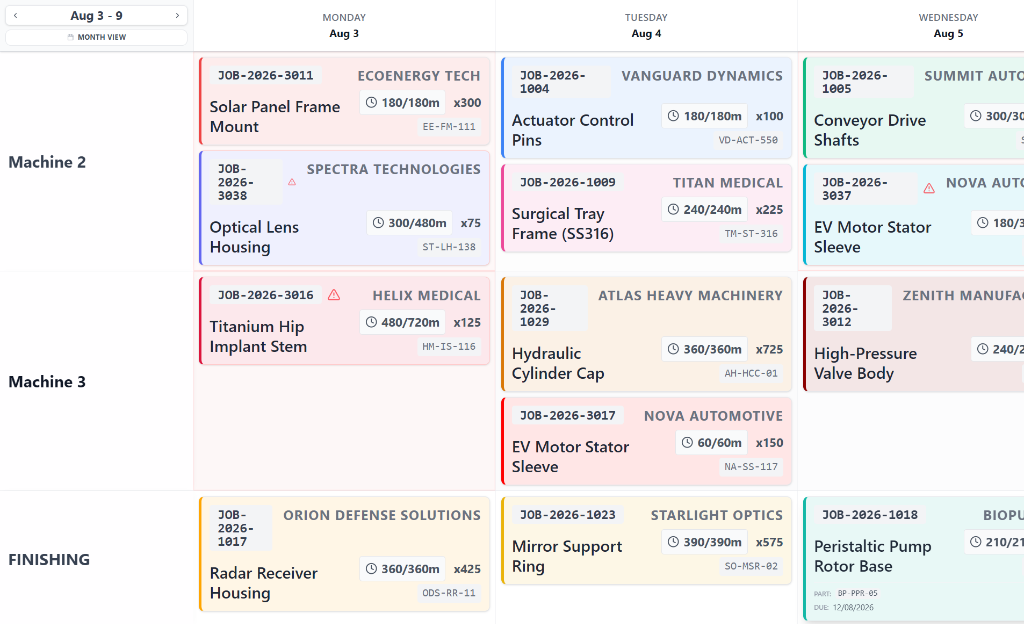
Shop floor TV mode: Wall-mounted displays give machinists and fabricators a clean, high-contrast view of the schedule that updates automatically. Operators always know what job to set up next without walking into the office to ask.
Start free trial
The Origin Story
Why manufacturing workshops were stuck between two bad options
For decades, small and mid-sized manufacturing workshops have been forced to choose between two frustrating extremes to schedule their work centres.
On one side is the traditional physical whiteboard or T-card rack. It is fast to glance at if you are standing right in front of it on the shop floor. But office staff cannot see it without walking out into the workshop, cards and magnets fall off, handwritten notes get smudged, and past records vanish as soon as someone cleans the board.
On the other side are monolithic enterprise ERP and MRP systems. They cost tens of thousands of pounds, take six months of consulting to set up, and require twenty clicks across dense menu trees just to mark a setup complete. Because operators dislike using them, data is rarely entered on time. The schedule in the system stops matching reality on day two.
We built Synctile to bridge that gap. A simple, visual drag-and-drop board that planners manage from a desktop browser, updating live on overhead TV screens and kiosks across the workshop in real time.
What Synctile is not: We do not try to be an accounting ERP
Many software vendors try to lock your entire business into one massive system that handles general ledger accounting, payroll, and purchasing. Synctile does not touch your balance sheet. It runs cleanly alongside Xero, QuickBooks, or whatever accounting system you already use, focusing entirely on visual scheduling and shop floor throughput.
Design Standards
Three rules that guide how we build Synctile
Every feature we add must meet three strict requirements before it reaches your shop floor.
If it needs a training manual, it has failed
Machinists and fabricators need to focus on tool setups and cycle times, not learning software menus. If an operator cannot understand the screen within two minutes of looking at it, the design is wrong.
Up and running in 15 minutes, not 6 months
You should never need external IT consultants or weeks of implementation. Import your active jobs from an Excel sheet, set up your work centres, and start scheduling on day one.
Readable from 20 feet away
Shop floors are bright, noisy, and fast-paced. We use high-contrast cards, bold indicators, and clean machine columns so anyone walking past an overhead display can see job priorities instantly.
Our Commitments
How we do business
We operate as a practical, independent software company dedicated to small and mid-sized manufacturing.
Direct support from the team
When you email or call us for help, you talk directly to the people who build and maintain Synctile. No outsourced support tiers, no scripted ticket responses, and no waiting days for an answer.
Zero data lock-in
Your shop data belongs to you. You can export your entire job list, routing notes, and schedule history to standard CSV files at any time with a single click.
Honest, transparent pricing
All pricing is published openly on our website. Every standard tier includes a full 90-day trial with complete feature access so you can verify the software on your actual production line before spending money.
Workshop Feedback
Feedback from shop floor managers
Production managers and company directors share their experience using Synctile on real work centres.
5.0
“We replaced our 6-foot magnetic whiteboard in one morning. The machinists took to it immediately on a couple screens on the shop floor because it works just like physical job cards without the lost paperwork.”
PM
Production Manager
Precision CNC Machining · 35-person shop 5.0
“Within our first month of running Synctile on our overhead monitors, our on-time delivery improved by about 7% simply because machine bottlenecks became visible before jobs fell behind schedule.”
MD
Managing Director
Custom Component Engineering · 20 CNC machines 5.0
“We run a mix of 3-axis mills and twin-spindle lathes. The whiteboard in our works office was always out of sync with what was happening on the spindles. Putting Synctile on two wall monitors in the workshop sorted out our shift handovers within the first week.”
WM
Works Manager
Sub-Contract Precision Engineering · 15 CNC machines
Frequently Asked Questions
Common questions about Synctile
Answers to common questions about setting up and running Synctile in your workshop.
Why was Synctile created?
Synctile was created to give machine shops and fabricators a simple, visual production schedule. Most workshops were caught between physical whiteboards that office staff could not see and heavy ERP systems that machinists refused to use.
How long does setup take?
Most workshops are up and running in ten to fifteen minutes. You add your machines or work centres, paste or import your active jobs from an Excel spreadsheet, and start dragging cards into place.
Does Synctile replace our accounting or quoting software?
No. Synctile is built strictly for visual scheduling, queue sequencing, and machine capacity planning. It runs alongside your existing accounting software like Xero or QuickBooks without requiring a complicated migration.
How do shop floor TV displays work?
Synctile runs in any standard web browser. You can display it on a smart TV, an inexpensive mini PC, or a wall-mounted tablet. The display updates live whenever a planner moves a job in the office.
What are the terms of the 90-day free trial?
You receive full, unrestricted access to every feature across all your machines and displays for 90 days. You can cancel anytime online before day 90 with no charges.
90-Day Risk-Free Trial
See how Synctile fits your shop floor
Test Synctile across your machines, kiosk displays, and real work orders for 90 days. Cancel anytime online before day 90 with no charges.
Instant setup in 15 minutes • Full access to all features • Cancel anytime online